
Switching from QuickBooks check workflows
QuickBooks check printing alternative for faster, simpler check runs
If you are frustrated with accounting-suite complexity, this quickbooks check printing alternative gives you a direct way to print checks without QuickBooks dependency.
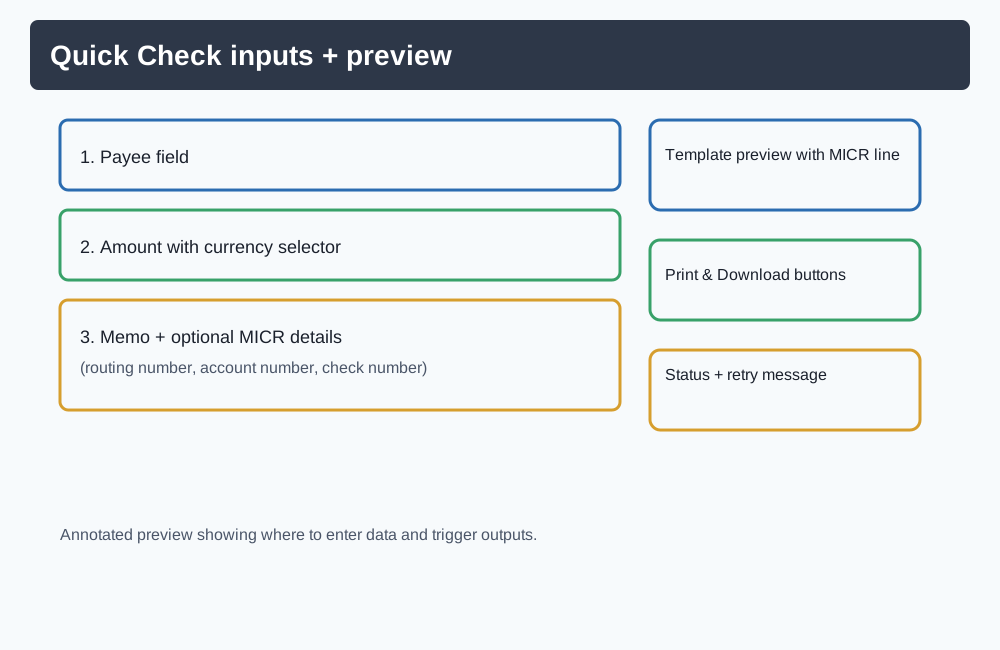
Start in Quick Check for immediate printing, then expand into account-based workflows when you need saved payees, reports, and history.
Why people leave QuickBooks for check printing
- QuickBooks can feel heavyweight when you only need to create and print checks.
- Teams often want a faster setup than a full accounting software workflow.
- Check printing tasks can get delayed when they are tied to broader accounting processes.
- Many businesses prefer a focused check workflow with fewer screens and less overhead.
QuickBooks check printing vs CheckCrafter
This comparison focuses on workflow differences visible in the product experience: setup, dependency, and speed to first check.
| Category | QuickBooks check printing | CheckCrafter |
|---|---|---|
| Setup | Set up inside an accounting suite workflow before printing checks. | Open Quick Check, enter details, preview, and print from a focused check flow. |
| Workflow focus | Built for end-to-end accounting plus check printing. | Built specifically for creating and printing checks quickly. |
| Dependency | Check printing is tied to QuickBooks usage. | Print checks without QuickBooks dependency. |
| Speed to first check | Often part of a broader bookkeeping setup. | Immediate path with Quick Check and instant preview. |
Print checks without QuickBooks and keep the process simple
You can print checks without QuickBooks by using a focused check workflow: enter payment details, preview for accuracy, and print right away. This avoids accounting software lock-in for teams that only need reliable check output.
Faster check printing workflow
Go from payee details to a print-ready check in minutes.
Focused check-only flow
Use a dedicated experience instead of navigating accounting features you do not need.
Reuse records for repeat payments
Save payees and account details to reduce repetitive entry.
Value and cost-fit for teams seeking cheap check printing software
If you are evaluating cheap check printing software, compare the total workflow cost—not only line-item pricing. CheckCrafter is built so teams can start quickly, avoid unnecessary accounting overhead, and move fast when checks are urgent.
How it works
Step 1
Enter payee and payment details
Fill in the required check fields with only the essentials.
Step 2
Preview before final output
Review formatting and details before generating your check.
Step 3
Print immediately
Generate a print-ready check you can print right away.
Step 4
Scale into full workflows
Create a free account to save records, manage payees, and run reports when needed.
Who this alternative is for
- Small business owners who just need checks printed quickly
- Freelancers paying contractors or vendors
- Bookkeepers managing recurring check runs
- Operations teams replacing slow, accounting-heavy check workflows
Operational confidence for check printing
Works with standard check printing workflows
Create print-ready output for business checks and use your normal print process.
Business-ready controls
Use saved payees, account records, and check history in authenticated workflows.
Privacy-oriented product messaging
Existing product copy highlights browser-local handling for guest exploration.
QuickBooks check printing alternative FAQ
Ready to switch from QuickBooks for check printing?
Start now with a simpler workflow that helps you create, preview, and print checks fast.